Aurora Now - Northern Lights
- 4.4
- Rating
- 100.00K
- Installs
- Free
- Price
 Analysis by App-foxy
Seeing the Northern Lights is one of those plans that can fail for a very ordinary reason: you arrive under a dark sky, wait in the cold, and discover that the display is unlikely to appear where you are standing. Aurora Now - Northern Lights is built around reducing that guesswork. It is a free weather app from VNIL AB that focuses on real-time aurora forecasting, rather than trying to be a complete replacement for a general weather service.
I found its main value in turning an exciting but uncertain idea into a more practical decision. Instead of asking only whether the aurora might be active, I would use the app to decide whether tonight is worth travelling for, whether I should wait a little longer, or whether cloud and visibility make the attempt unrealistic. That distinction matters: an aurora forecast can point you toward an opportunity, but it cannot guarantee a clear view from your exact spot.
The app is available at no cost and is suitable for everyone from an age-rating perspective. It has reached over one hundred thousand installs and holds a 4.4 average from around one and a half thousand ratings, which suggests that it has found a clear audience among people who want a dedicated way to follow Northern Lights activity. The current version is 1.8.1, and it runs on Android 7.0 or later. Optional in-app purchases range from $1.99 to $39.99 per item, so I would treat the free experience as the starting point and check what any paid option adds before spending money.
You May Also Like

 Blood Strike: 2.5 Anniversary
Blood Strike’s Loadouts Turn Every Drop Into a Tactical Gamble
A close look at Blood Strike’s custom loadouts: how fast access to signature weapons reshapes its battle royale rhythm, rewards preparation, and narrows the gap between fights.

 Pandora - Music & Podcasts
Pandora’s Music Is Easy to Start, but Harder to Recover
Pandora’s strength is its low-effort path from a seed to a station. Its weak spot is how much confidence it asks you to place in connection, setup, and quiet recovery.

 8 Ball Pool
 Is Built on Rivalries, Rematches, and Routine
A close look at the rivalries, rematches, shared routines, and unanswered safety questions that turn a quick pool match into a persistent mobile community.

 Samsung Music
’s Quiet Strength Is Playing What You Already Own
Its reach comes less from spectacle than from dependable access to a personal library. That simplicity is both the app’s strongest retention engine and its ceiling.

 AccuWeather: Weather Radar
AccuWeather Review: A Quick, Clear Forecast for Everyday Decisions
For everyday plans, the best forecast is the one you can understand quickly. AccuWeather makes rain timing, radar, and local conditions easy to act on, with a few trade-offs.

 Hill Climb Racing
Why Hill Climb Racing Still Turns Crashes Into One More Run
A tiny car, a bumpy hill and one more upgrade: Hill Climb Racing keeps resurfacing because its simple chaos makes every near-miss feel personal.
More From Our News Desk



Why the real-time aurora forecast matters
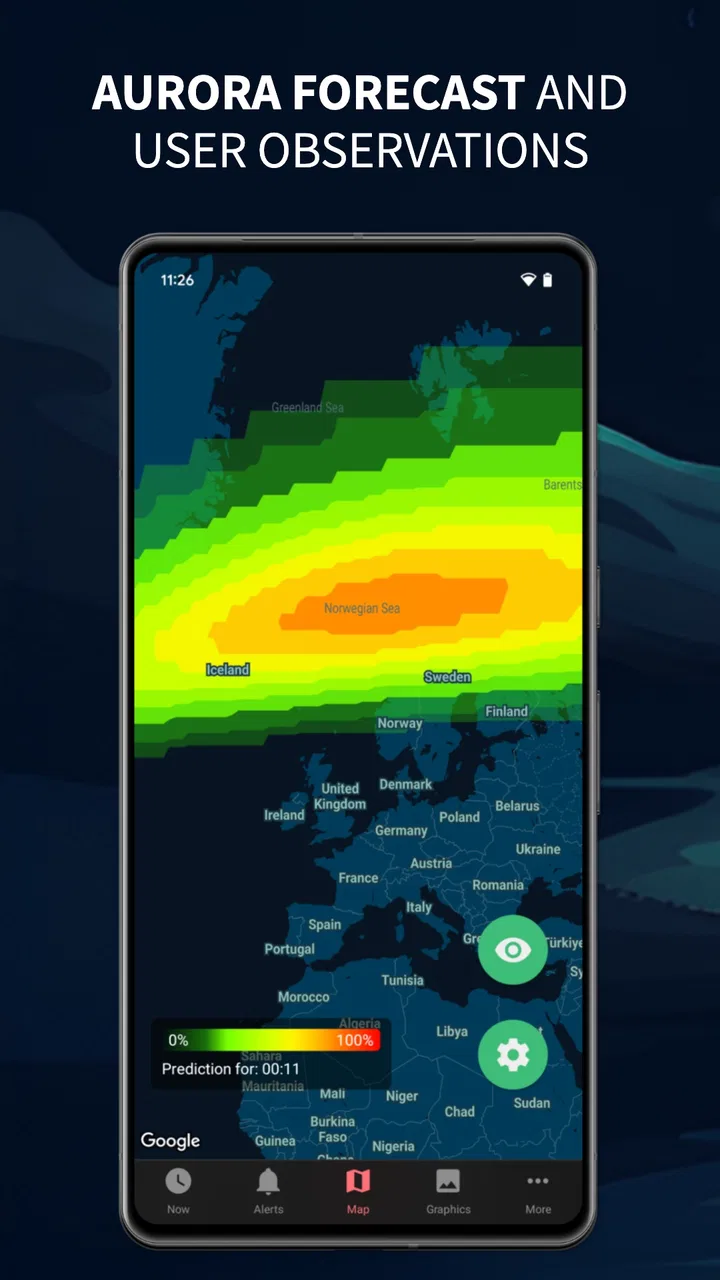
The strongest capability here is the real-time aurora forecast. That sounds simple, but it changes how I would plan an observation night. A general weather app can tell me about rain, cloud, temperature and wind. It usually does not help me understand whether geomagnetic activity is developing in a useful way for aurora viewing. A dedicated aurora app puts that particular question at the centre.
In practice, this means I would not open it just to admire a colourful prediction. I would use it as a filter. First, I would check whether the aurora outlook looks promising. Then I would compare that opportunity with local cloud cover, darkness, travel time and the amount of light around my intended viewing location. The forecast is most useful when it becomes one part of a decision instead of the entire decision.
That is also where the app is more focused than ordinary alternatives. A standard weather application is better for a complete picture of the day, including hourly rain, wind and temperature details. A broad astronomy application may be better for identifying stars, planets or other sky events. Aurora Now is more appealing when the question is specifically, “Is there a sensible chance of seeing the Northern Lights soon?”
I appreciate that focus because aurora chasing is often spontaneous. Conditions can change while I am deciding whether to leave home. A forecast that updates around current activity is more useful for that situation than a static seasonal guide or a generic explanation of how auroras form. It helps me move from curiosity to action without pretending that nature is predictable down to the minute.
Reading the forecast without overtrusting it
The most important habit is to treat the forecast as guidance, not a promise. A strong aurora signal does not remove clouds. It does not make a bright town ideal for viewing. It does not guarantee that the display will be visible to the naked eye, and it does not tell me that the best moment will happen at a convenient time.
I would therefore use the app in stages. During the day, I would look for a reason to keep the evening open. Later, I would check again before travelling. Once outside, I would give my eyes time to adjust and avoid judging the sky after only a quick glance. The app can improve the timing of those choices, but the final experience still depends on local conditions and patience.
This is a useful trade-off for newcomers. The interface and purpose are easier to understand than a collection of technical space-weather charts, yet that simplicity can encourage overconfidence if the viewer assumes every positive indication equals visible lights. My advice is to combine its aurora information with a normal weather forecast and a map or local knowledge of darker places.
How I would use it before leaving home
My preferred workflow would begin with location and timing. I would open the app when I first start thinking about an outing, note whether activity appears worth following, and then check again close to departure. If the forecast looks interesting but the sky is covered by thick cloud, I would stay home rather than treating the aurora signal as a reason to travel anyway.
If conditions look workable, I would choose a viewing point with a broad horizon and as little artificial light as possible. I would also plan the return journey before leaving. That may sound unrelated to the app, but it is an important part of using a forecast responsibly: the best prediction is not much help if the trip is rushed, unsafe or too short to allow for changing conditions.
One non-obvious benefit of this workflow is that it reduces wasted anticipation. Without a dedicated forecast, I might repeatedly check the sky because I had heard that auroras were possible somewhere in the region. With a focused tool, I can set a clearer threshold for myself: promising enough to monitor, promising enough to travel, or not worth pursuing tonight.
I would also avoid checking it only at the exact moment I want to see the lights. Real-time information is most valuable when it supports a sequence of decisions. A quick glance before bed, another check after the weather changes, and a final look before setting out can produce a much more sensible plan than one dramatic prediction viewed in isolation.
A realistic evening with Aurora Now
Imagine I am visiting a northern town for a weekend and have one free evening. In the afternoon, I use the app to see whether aurora activity gives me a reason to keep the night flexible. The indication is encouraging, but the local forecast suggests uneven cloud. I do not immediately book a long drive. Instead, I identify a nearby dark location and wait for a later update.
After dinner, the app still suggests that the opportunity is worth watching. The cloud has begun to break, so I pack warm clothing, a phone charger and a small tripod, then travel to the planned spot. Once there, I use the forecast as a reason to remain patient rather than as proof that the sky must light up immediately. If the cloud closes in completely, I leave without feeling that the whole evening was badly planned.
That is the practical effect I noticed in the concept of this app: it can make the experience less random. It does not create an aurora, improve the weather or replace local judgement. It helps answer whether the possibility is strong enough to justify attention, preparation and perhaps a short trip.
Where the app fits beside ordinary weather tools
I would not uninstall my regular weather app after installing this one. For an aurora outing, I need both types of information. The dedicated forecast helps with the phenomenon itself, while the general weather service remains better for cloud layers, precipitation, wind and temperatures that affect comfort and visibility.
The comparison is similar with astronomy apps. Those tools can be excellent when I want to identify objects in the sky or plan a broader stargazing session. Aurora Now makes more sense when the Northern Lights are the specific event I am following. Its narrower purpose is a strength for a focused user, but it is also the reason it may feel unnecessary to someone who only wants one all-purpose sky application.
I would also place it below local expert groups or established community alerts when I need detailed, location-specific advice from people already outside. Human reports can explain what the sky actually looks like at a nearby viewpoint. The app is more convenient for checking the opportunity before I commit, while local observers may provide better confirmation once activity begins.
The trade-offs I would consider first
The first limitation is uncertainty. Real-time forecasting can improve timing, but it cannot promise visibility. Anyone expecting a simple green “go now” signal may become disappointed, especially when cloud, light pollution or a weak display gets in the way. The app is best for improving decisions, not eliminating risk.
The second is that a specialist tool naturally leaves some work to the user. I still need to understand my local sky, choose a dark location and consider practical travel conditions. Someone looking for a complete hourly forecast, severe-weather warnings and everyday planning in one place will probably prefer a full weather application as their main tool.
The third trade-off concerns optional spending. The app is free to start, but in-app purchases are available from $1.99 to $39.99 per item. I would use the free version first and only consider an upgrade after understanding how often I chase auroras and which extra information would genuinely change my decisions. A casual holiday visitor may gain enough from the basic experience, while a committed observer could value more detailed tools if they fit the way they plan trips.
There is also a psychological trap worth mentioning: frequent checking can make an outing feel like a test of the forecast rather than an evening outdoors. I would use the app to choose reasonable opportunities, then put the phone away for stretches of time. The Northern Lights are still a visual experience, and staring continuously at a bright screen works against dark adaptation.
Small habits that improve the experience
My first tip is to check the forecast against the actual sky before travelling far. If the app indicates activity but the horizon is already hidden by heavy cloud, the sensible response may be to wait rather than drive farther. That simple comparison prevents the most expensive mistake: turning a promising signal into an unnecessary journey.
My second tip is to choose a repeatable viewing location. If I return to the same dark spot, I learn its horizon, parking situation and nearby lights. Then the forecast becomes easier to interpret because I am no longer solving the location problem at the same time. The app is more useful when the physical part of the plan is already familiar.
My third tip is to plan for patience rather than a single instant. I would dress for standing still, allow enough time for my eyes to adjust and avoid leaving after only a few minutes of weak activity. A forecast can tell me that an opportunity is developing, but staying long enough to benefit from it is still my responsibility.
For photography, I would treat the app as a planning aid rather than a camera controller. I would prepare the camera separately, keep the phone from becoming the brightest object around me, and remember that a camera may record colour or detail that is difficult to see immediately with the naked eye. That difference can make a successful photograph and a satisfying visual experience feel like two related but separate goals.
Who will get the most from it
This app is a strong fit for travellers who have only a few nights in an aurora region and want to use their time intelligently. It is also useful for residents who already know good viewing places but need a quick way to decide whether tonight deserves attention. Beginners may appreciate the focused purpose because it avoids forcing them to learn a large set of space-weather measurements before making a simple plan.
It may be especially helpful for people who tend to make last-minute decisions. A dedicated real-time forecast can turn “perhaps I should go outside” into a more structured choice based on activity, cloud and distance. That does not make the outing certain, but it can make the decision less impulsive and less wasteful.
I would be more cautious about recommending it to someone who rarely watches the sky, lives where auroras are exceptionally uncommon, or wants a single app for all weather needs. In those cases, a standard weather application may provide more daily value. Likewise, experienced aurora photographers who already follow several specialist sources may find this app most useful as a convenient additional check rather than their only source.
The age rating of Everyone makes it easy to share the idea with a family, and the free entry point lowers the barrier for someone who is simply curious. Still, the real benefit depends on having a reasonable chance of reaching a dark viewing area. If I cannot see the sky from my location or cannot travel when conditions improve, a forecast alone will not change the outcome.
My final view after weighing the purpose
I see Aurora Now as a focused planning companion, not a magical aurora detector and not a replacement for a complete weather service. Its real-time forecast is valuable because it helps me decide when to pay attention and when not to waste a journey. That is a modest promise, but it is the right one for a natural event that remains unpredictable.
VNIL AB has aimed the app at a clear need, and the result makes the most sense when I use it alongside local weather information, a dark location and realistic expectations. I would recommend trying the free version before considering any in-app purchase, especially because the available items can cost from $1.99 to $39.99 each.
For me, the best reason to install it is not the hope of seeing a spectacular sky every time. It is the ability to make better choices about when an attempt is worth the effort. If you are planning a northern trip, live in an aurora-prone area, or simply want a dedicated way to follow Northern Lights activity, this app deserves a place in your toolkit. If you want broad daily weather coverage or guaranteed results, I would choose a different primary app and use this one only when the aurora itself becomes the focus.
FAQs for Aurora Now - Northern Lights
01What is Aurora Now - Northern Lights, and how does it work?
Aurora Now - Northern Lights is a mobile app designed to help users track and predict the visibility of the Northern Lights or Aurora Borealis. It uses real-time data and forecasts from space weather sources to provide alerts and notifications about aurora activity. The app features a user-friendly interface with maps and graphs to help users plan their viewing experience effectively.
02Is Aurora Now - Northern Lights suitable for beginners and advanced users?
Yes, Aurora Now - Northern Lights caters to both beginners and advanced users. Beginners will appreciate the straightforward alerts and simplified maps, while advanced users can delve deeper into detailed data and complex forecasting models. The app provides customizable settings, allowing users to tailor the information according to their expertise and preferences.
03Does Aurora Now - Northern Lights require an internet connection to function?
Yes, Aurora Now - Northern Lights requires an internet connection to fetch real-time data and provide accurate forecasts. The app relies on live space weather updates and geomagnetic data to predict aurora visibility. Users should ensure they have a stable internet connection for the app to function effectively and deliver timely notifications.
04What regions does Aurora Now - Northern Lights cover, and is it useful outside the Arctic Circle?
Aurora Now - Northern Lights covers regions where the aurora is commonly visible, primarily focusing on areas within and near the Arctic Circle. However, the app can also provide useful information for locations further south during periods of high geomagnetic activity. Users outside typical viewing areas can still benefit from alerts when conditions are favorable.
05Are there any in-app purchases or subscriptions in Aurora Now - Northern Lights?
Aurora Now - Northern Lights offers a free version with basic features. However, there are in-app purchases and subscription options for users who wish to access premium features such as advanced forecasting tools, ad-free experience, and personalized alerts. These options are designed to enhance the user experience for those seeking more detailed information and functionality.
Pros
- Beautiful
- user-friendly interface.
- Real-time aurora forecasts.
- Customizable alert notifications.
- Detailed aurora location map.
- Compatible with both Android and iOS.
Cons
- Requires internet for updates.
- Limited free features
- premium needed.
- Notifications can be delayed.
- Battery drain with constant use.
- May not cover all geographic areas.

Aurora Now - Northern Lights
Gallery